About AudioScope
AudioScope is an invaluable audio plugin for mixing and mastering with a toolbox of additional mixing aids. It was originally created as a method for comparing your mix to a reference track and seeing exactly what...
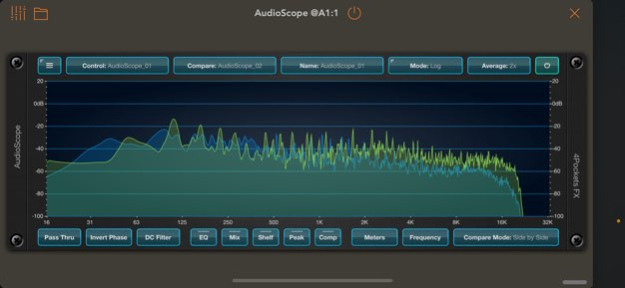
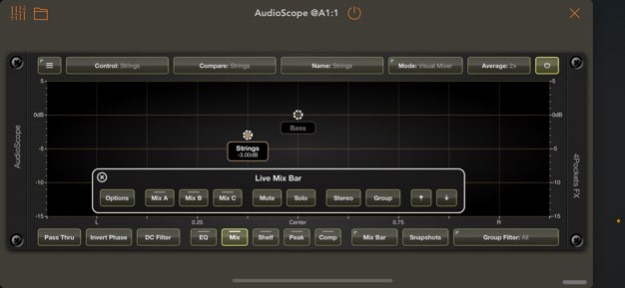
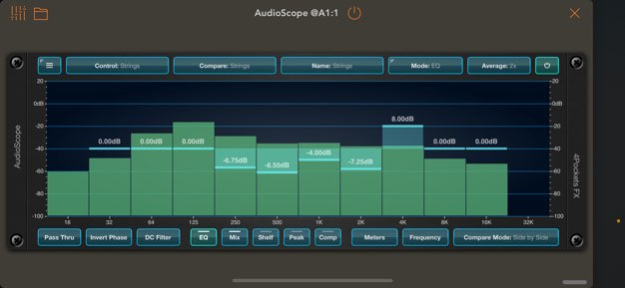
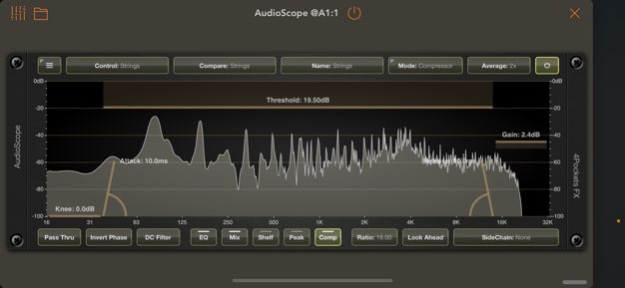
AudioScope is an invaluable audio plugin for mixing and mastering with a toolbox of additional mixing aids. It was originally created as a method for comparing your mix to a reference track and seeing exactly what frequencies to tweak in order to obtain a desired match. This alone is incredibly useful for creating the feel of a particular genre of music, by tweaking your mix to match. AudioScope is so much more than this! It includes a great visual mixer which enables you control your entire mix from a single window inside your DAW. You see a top-down visualisation of your entire mix and stereo balance. You can save up to 3 compare mixes and quickly switch between them. You can also save up to 12 snapshots of stereo positions and levels, then morph between them. All of this functionality is available via MIDI, so with one simple CC command, you can switch out one mix for another or engage a snapshot. You are able to group your drums and other elements so that the mix doesn't become overwhelming, allowing you to focus on a subset of key elements if you wish. AudioScope also includes a suite of tools to adjust EQ, compression, and overall balance of your mix. The way AudioScope works is unique, with a quick and easy workflow: Insert an instance of AudioScope on each of your track's Insert Effect slot and name the track. Now simply open one of the instances and you have the ability to control all tracks from a single window. AudioScope is equiped with its own shelf and peak filters, EQ and lookahead compressor (with Sidechain). You can find demonstrations and tutorials for this and all my apps on the 'Paul the MusicMan' YouTube channel. Features: ○ Take control of your host DAW using a single simple interface. ○ Compare your master mixes frequency response to a reference track for a given genre. ○ Compare tracks to see which frequency ranges are problematic graphically. ○ Control your DAW's entire mix from a single 2D live mixer. ○ Change the EQ of each track quickly and easily from a single window. ○ Includes the ability to add low and high shelf filters to each track. ○ Add up to 3 parameteric EQ's to each track to cut or boost frequency ranges. ○ Enable the internal look ahead sidechain compressor. ○ Capture up to 3 compare mixes and preview in real time. ○ Create up to 12 snapshots and fade from one to another. ○ Invert the phase of tracks to avoid phasing issues. ○ Remove DC option to remove unwanted noise and rumble below 60Hz. ○ Instant Pass Thru to bypass all instances of AudioScope. ○ Mix lock to prevent accidental changes to your mix. ○ Monitor up to 32 tracks at once.
Version History v1.07 B35 Fixed toolbar issue on iOS27 / iOS26.6 Other small fixes. 1.0.7 Sep 25 v1.06 B34 Fixed toolbar content issue misalignment in iOS26.1 (due to bug in iOS 26.1 was fiine in 26.0) 1.06 11/24/2025 v1.05 B33 Added scene support to support future iOS Versions. 1.05 08/29/2025 v1.04 B31 Fix for the Compressor Sidechain option not sticking between sessions. 1.04 06/26/2024 Fixed an issue running under Logic Pro for iPad which causes duplicate instances to appear. 1.03 07/19/2023 v1.02 Added the ability to select either 24/48dB for each tracks shelf filters. Added the ability to select 24/48fB gain for the peak filters. Fixed issues with exposed AU parameters for peak filters not properly updating graph. Added a TipJar to the main menu to help with ongoing development of this and other apps. Other minor fixes. 1.02 05/12/2023 This version makes better use of screen space when hosted as a plugin, especially in porrait mode. Added the ability to mute/unmute a specified group (long press mute). Added extra long glide times to the snapshots (24, 32 and 64 beats). Added the ability to see which items in the mix graph are muted. On screen rotation forced the snapshots view within bounds. Fixed an issue which caused a white band around the bottom of the interface at certain resolutions. Changing graphic averaging now modifies both control and compare tracks. 1.01 05/05/2023 1.0 04/24/2023
Previous Versions
Here you can find the changelog of AudioScope since it was posted on our website on 2023-07-03 20:25:57.
The latest version is 1.0.7 and it was updated on 2026-10-06 13:33:47. See below the changes in each version.
AudioScope version 1.0.7
Updated At: 2026-10-06
Changes: Version History v1.07 B35
Fixed toolbar issue on iOS27 / iOS26.6
Other small fixes. 1.0.7 Sep 25 v1.06 B34
Fixed toolbar content issue misalignment in iOS26.1 (due to bug in iOS 26.1 was fiine in 26.0) 1.06 11/24/2025 v1.05 B33
Added scene support to support future iOS Versions. 1.05 08/29/2025 v1.04 B31
Fix for the Compressor Sidechain option not sticking between sessions. 1.04 06/26/2024 Fixed an issue running under Logic Pro for iPad which causes duplicate instances to appear. 1.03 07/19/2023 v1.02
Added the ability to select either 24/48dB for each tracks shelf filters.
Added the ability to select 24/48fB gain for the peak filters.
Fixed issues with exposed AU parameters for peak filters not properly updating graph.
Added a TipJar to the main menu to help with ongoing development of this and other apps.
Other minor fixes. 1.02 05/12/2023 This version makes better use of screen space when hosted as a plugin, especially in porrait mode.
Added the ability to mute/unmute a specified group (long press mute).
Added extra long glide times to the snapshots (24, 32 and 64 beats).
Added the ability to see which items in the mix graph are muted.
On screen rotation forced the snapshots view within bounds.
Fixed an issue which caused a white band around the bottom of the interface at certain resolutions.
Changing graphic averaging now modifies both control and compare tracks. 1.01 05/05/2023 1.0 04/24/2023
AudioScope version 1.0.7
Updated At: 2026-10-02
Changes: Version History v1.07 B35
Fixed toolbar issue on iOS27 / iOS26.6
Other small fixes. 1.0.7 6d ago v1.06 B34
Fixed toolbar content issue misalignment in iOS26.1 (due to bug in iOS 26.1 was fiine in 26.0) 1.06 11/24/2025 v1.05 B33
Added scene support to support future iOS Versions. 1.05 08/29/2025 v1.04 B31
Fix for the Compressor Sidechain option not sticking between sessions. 1.04 06/26/2024 Fixed an issue running under Logic Pro for iPad which causes duplicate instances to appear. 1.03 07/19/2023 v1.02
Added the ability to select either 24/48dB for each tracks shelf filters.
Added the ability to select 24/48fB gain for the peak filters.
Fixed issues with exposed AU parameters for peak filters not properly updating graph.
Added a TipJar to the main menu to help with ongoing development of this and other apps.
Other minor fixes. 1.02 05/12/2023 This version makes better use of screen space when hosted as a plugin, especially in porrait mode.
Added the ability to mute/unmute a specified group (long press mute).
Added extra long glide times to the snapshots (24, 32 and 64 beats).
Added the ability to see which items in the mix graph are muted.
On screen rotation forced the snapshots view within bounds.
Fixed an issue which caused a white band around the bottom of the interface at certain resolutions.
Changing graphic averaging now modifies both control and compare tracks. 1.01 05/05/2023 1.0 04/24/2023
AudioScope version 1.06
Updated At: 2026-09-25
Changes: Version History v1.06 B34
Fixed toolbar content issue misalignment in iOS26.1 (due to bug in iOS 26.1 was fiine in 26.0) 1.06 11/24/2025 v1.05 B33
Added scene support to support future iOS Versions. 1.05 08/29/2025 v1.04 B31
Fix for the Compressor Sidechain option not sticking between sessions. 1.04 06/26/2024 Fixed an issue running under Logic Pro for iPad which causes duplicate instances to appear. 1.03 07/19/2023 v1.02
Added the ability to select either 24/48dB for each tracks shelf filters.
Added the ability to select 24/48fB gain for the peak filters.
Fixed issues with exposed AU parameters for peak filters not properly updating graph.
Added a TipJar to the main menu to help with ongoing development of this and other apps.
Other minor fixes. 1.02 05/12/2023 This version makes better use of screen space when hosted as a plugin, especially in porrait mode.
Added the ability to mute/unmute a specified group (long press mute).
Added extra long glide times to the snapshots (24, 32 and 64 beats).
Added the ability to see which items in the mix graph are muted.
On screen rotation forced the snapshots view within bounds.
Fixed an issue which caused a white band around the bottom of the interface at certain resolutions.
Changing graphic averaging now modifies both control and compare tracks. 1.01 05/05/2023 1.0 04/24/2023
AudioScope version 1.06
Updated At: 2025-11-24
Changes: v1.06 B34
Fixed toolbar content issue misalignment in iOS26.1 (due to bug in iOS 26.1 was fiine in 26.0)
AudioScope version 1.05
Updated At: 2025-08-29
Changes: Aug 29, 2025
Version 1.05
v1.05 B33
Added scene support to support future iOS Versions.
AudioScope version 1.04
Updated At: 2024-06-26
Changes: Jun 26, 2024
Version 1.04
v1.04 B31
Fix for the Compressor Sidechain option not sticking between sessions.
AudioScope version 1.03
Updated At: 2023-07-19
Changes: Jul 19, 2023
Version 1.03
Fixed an issue running under Logic Pro for iPad which causes duplicate instances to appear.
AudioScope version 1.02
Updated At: 2023-05-12
Changes: May 12, 2023
Version 1.02
v1.02
Added the ability to select either 24/48dB for each tracks shelf filters.
Added the ability to select 24/48fB gain for the peak filters.
Fixed issues with exposed AU parameters for peak filters not properly updating graph.
Added a TipJar to the main menu to help with ongoing development of this and other apps.
Other minor fixes.
Disclaimer
Official App Store Link
We do not host AudioScope on our servers. We did not scan it for viruses, adware, spyware or other type of malware. This app is hosted by Apple and passed their terms and conditions to be listed there. We recommend caution when installing it.
The App Store link for AudioScope is provided to you by apps112.com without any warranties, representations or guarantees of any kind, so access it at your own risk.
If you have questions regarding this particular app contact the publisher directly. For questions about the functionalities of apps112.com contact us.